

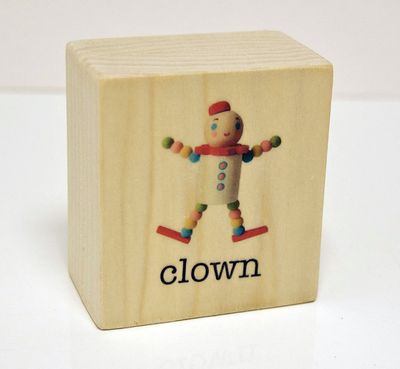
Here’s another fantastic idea from Katie at Matsutake: transfer inkjet images simply and easily to wood. It looks so pretty, and the image is brilliant! I can think of so many great projects using this application, and I bet you can too! [click here for tutorial]
It would be fun to use this application to create Melissa & Doug-type wooden puzzles or toys, blocks, personalized signs, and my personal favorite idea this year, a nativity set. Now I just have to learn how to use a jigsaw!
Project Estimate:
- Wooden something or other, $1
- Elmer’s Washable Glue, on hand or $1
- Mod Podge, on hand or about $2 for a small bottle
- Piece of cardstock, on hand
Total: $1 and up





7 Comments
Amy's Stocking Stuffers
What a terrific idea! I’m off to follow the link to see if it’s something even klutzy I could do! (And I love the idea of a nativity scene.)
Kathy V.
It looks so easy and cool!
pam
I love this! This technique would have com in so handy when I was building my advent calendar!
Sarah
I love this! I’m going to use it to make my mother and mother-in-law some 6-sided block puzzles. Easier than gluing and gluing and triming… LOL
heather
@Sarah, Awesome idea!
Marissa
Thanks for tweeting about this one. I love how crisp the colors came out. I agree, a nativity set would be awesome!
jason
I had used both cardstock and transparencies applications and the color still lifts. I’m assuming it is my ink in my HP printer. Would I be better off using an Epson printer?